Let's start Linux !
I'm Proficient in a variety of Big Data technologies, including AWS, Azure, GCP, Hadoop, Databricks, Pyspark, Sql, Python, Docker, Jenkins, Git/GitHub, Kubernetes, Azure Data Engineering.
A Brief History
Linux is an open-source operating system that was first released on September 17, 1991, by Linus Torvalds.
Basic Linux Commands
Listing commands - These commands are used to list the files and directories in the current working directory.
ls -l--> list the files and directories in long list format.
ls -a--> list all including hidden files and directory.
ls -i--> list the files and directories with index numbers.
ls *.txt--> list all the files having .txt extensions.
Directory commands - These commands are used to create, change directories
pwd--> print work directory. Gives the present working directory.
cd--> change directory.
cd path--> change directory to the provided path.
cd ..--> change directory to one step back.
cd /home-->change to home directory.
mkdir directoryname--> to make a new directory.
mkdir .directoryname--> to create a hidden directory.
mkdir x y z--> to create multiple directories.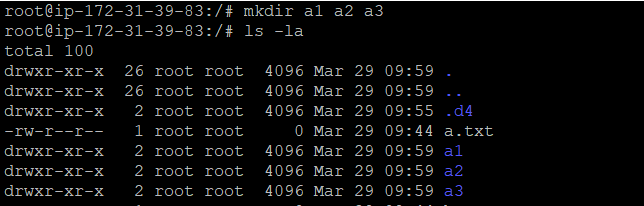
mkdir -p x/y/z--> to create nested directories.
Thanks for reading.
- Bikram Chatterjee